Description
Game Introduction
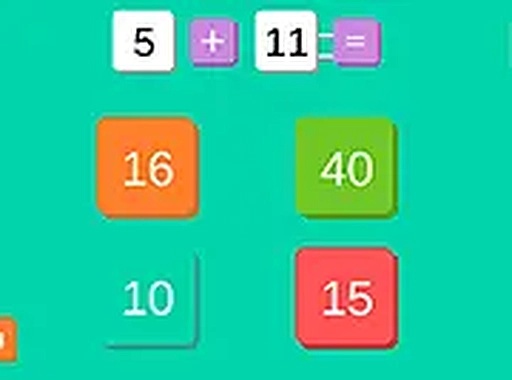
Quick Math Puzzle Challenge is an educational puzzle game designed to help players improve their mental arithmetic skills. The core objective is to solve math problems as quickly and accurately as possible. Players are presented with a series of arithmetic questions and must select the correct answer from multiple choices. The game includes addition, subtraction, division, multiplication, and a mixed mode that combines all four operations. A countdown timer adds a sense of urgency, rewarding faster answers with higher scores. This game is suitable for students, adults, and anyone who enjoys brain teasers. It is free to play directly in a browser, with an optional full-screen mode for a more focused experience. The combination of learning and fun makes it ideal for short breaks or daily practice. The game is designed to be accessible to players of all skill levels, from beginners to advanced math enthusiasts.
How to Play
To start, players choose their preferred math operation from the menu: addition, subtraction, division, multiplication, or mixed. Once the game begins, a math problem appears on the screen along with several answer choices. Players click on the correct answer using a mouse or select it via keyboard. Each correct answer adds points to the score. The timer counts down, requiring quick and accurate thinking. The game is designed for desktop use with a mouse or keyboard. Players can activate full-screen mode for a larger view. The game continues until time runs out, and the final score is displayed. The goal is to beat previous high scores by solving as many problems as possible.
Game Features
Fast-paced math challenges with multiple operations. Timer-based gameplay encourages quick thinking. Choose from addition, subtraction, division, multiplication, or mixed mode. Points are awarded for each correct answer, with faster answers earning more. Full-screen mode is available for an immersive experience. Free to play with no downloads required. Suitable for all ages and skill levels. Simple controls using mouse or keyboard.
Tips for Success
Practice regularly to improve calculation speed and accuracy. Focus on one operation at a time before trying mixed mode. Stay calm under time pressure to avoid mistakes. Use keyboard shortcuts if available to answer faster. Review incorrect answers to learn from errors. Set personal goals to gradually increase the number of correct answers per round. Take short breaks to maintain concentration. Consistent practice will help build mental math skills over time.